• Skip to main content

Pre-Med Community

Helping pre-medical students get into medical school across the nation

  • About
    • FAQ
    • Leave us feedback!
    • Contact Us
  • Articles
    • Application Advice
    • Pre med 101
    • Pre med advice
    • Study tips
    • MCAT
    • Reviews
    • PMC news
  • Premed Resources
    • FAQ from Pre-meds
    • Medical School Database
    • MCAT Resources
      • MCAT Information and links
      • MCAT Preparation Resources
      • Psychology and Sociology Terms for the MCAT
    • Research Opportunities for Pre-meds
    • Volunteer Opportunities for Pre-meds
    • Postbaccalaureate Pre-med Progams
    • Videos for Pre-med students
    • Pre-Med poll archive!
  • Member’s area
    • Join the community!
    • Login/Customize profile
    • Free member downloads

Archives for September 2017

Sep 15 2017

The best flashcard app for pre-med students

The Best Flashcard App for Pre-Med Students



There are many great apps out there for pre-meds. In this article I am going to go over one of the best apps for flash cards and why you should use it. I would consider this app one that every pre-med student should have. Flashcards are one of the best ways to memorize information as they provide a great way to remember a lot of material in a short period of time. For some classes, making flashcards is a necessity. If you haven’t taken a class where you had to make flashcards, you probably will soon. If you have taken a class where had to make flashcards, you know the struggle that comes with making them.

When I was studying for organic chemistry II, I literally made over 100 flashcards by hand and had a stack of cards that was half a foot tall. Not only did it take a long time to make the flashcards by hand, but also storing them was a problem. It was inconvenient to try and use them and review them because of the sheer quantity of cards I had. Thats when having an app that does it for you is very beneficial.


So what flash card app do you recommend?


Flashcard Hero


(Mobile version)

(Desktop version)

I tried several flashcard apps and the one that I found to be the most useful to me was “Flashcard Hero“. There are several apps out there that only do a very rudimentary job. Flashcard Hero has all of the functionality that you want in a flashcard app. With Flashcard Hero you can..


    • Quickly and easily make new flashcards
    • Sync your cards between your computer and phone (Requires both desktop and mobile version)
    • Organize your flashcards into sets
    • Add photos to your flashcards
    • Use advanced text formatting options
    • Make multiple choice questions or fill in the blank questions
    • Search through your flashcards for specific words
    • Study your flashcards based on difficulty, how long since you last studied, and the Leitner system
    • Use your phone as a remote controller to study flashcards on your computer
    • Audio output of text if desired
    • Detailed study session summaries
    • Export decks as PDF files, share online, and print decks
    • Import decks you already have (.tsv, .csv, from Quizlet.com)


I found that Flashcard Hero has all the functionality you will ever need for any class you are going to take. I personally used Flashcard Hero for studying for the MCAT with great success. I made a deck of over 1000 flashcards that I organized into several sets such as: MCAT math, General Chemistry, Organic Chemistry, Biology/Biochemistry, Physics, Sociology/Psychology, CARS, and General MCAT tips. With this I was able to study these flashcards on my computer and on my phone. This allowed me to flexibility to study on the go or while at home conveniently. You can download the exact MCAT deck I personally used on the members download page for free.

Being able to make flashcards on your computer is incredibly convenient thanks to being able to copy and paste text and add pictures. This makes it way easier to bulk create flashcards for your classes. And as mentioned before you won’t have to worry about storing your flashcards on you. Combine this with the mobile app and you will be able to view your flashcards anywhere you go. I can honestly say that I owe the 130 I made on the Psychology and Sociology section of the MCAT to the flashcards I made with this app. It also helped me tremendously in memorizing equations and reactions. Part of how I was able to raise my MCAT score by 8 points in one month was because of this app. Let me show you inside the app so you can see for yourself what it can do.


Screenshots I took from the app: (Desktop version)


Screenshot #1:


Here are the different sets that I organized my flashcards into for my MCAT deck. 


Screenshot #2:


Here we can see how you can add photos to your flashcards and on the left we can see if the flashcard is marked as easy (Green) or as difficult (Red). Also on the right we can see the advanced text formatting options available.


Screenshot #3:


Here we can see just how easy it is to add a card or topic.


Screenshot #4:


Here we can see the search functionality that allows you to find any word or phrase from your flashcards.


Screenshot #5:


Here we can see how you can study your flashcards based on difficulty.


Screenshot #6:


Here we can see how you can study using the Leitner System.


Screenshot #7:


Here we can see how it looks to study the flashcards. Notice you can also study based on fill in the blank (type) and multiple choice. 


You can download the exact MCAT flashcard set that I used to study for the MCAT on the member downloads page.


Screenshots I took from the app: (Mobile version)


Screenshot#1


Here is how the sets are organized in a deck.


Screenshot #2:


Here is how the flashcards look inside a set.


Screenshot #3:
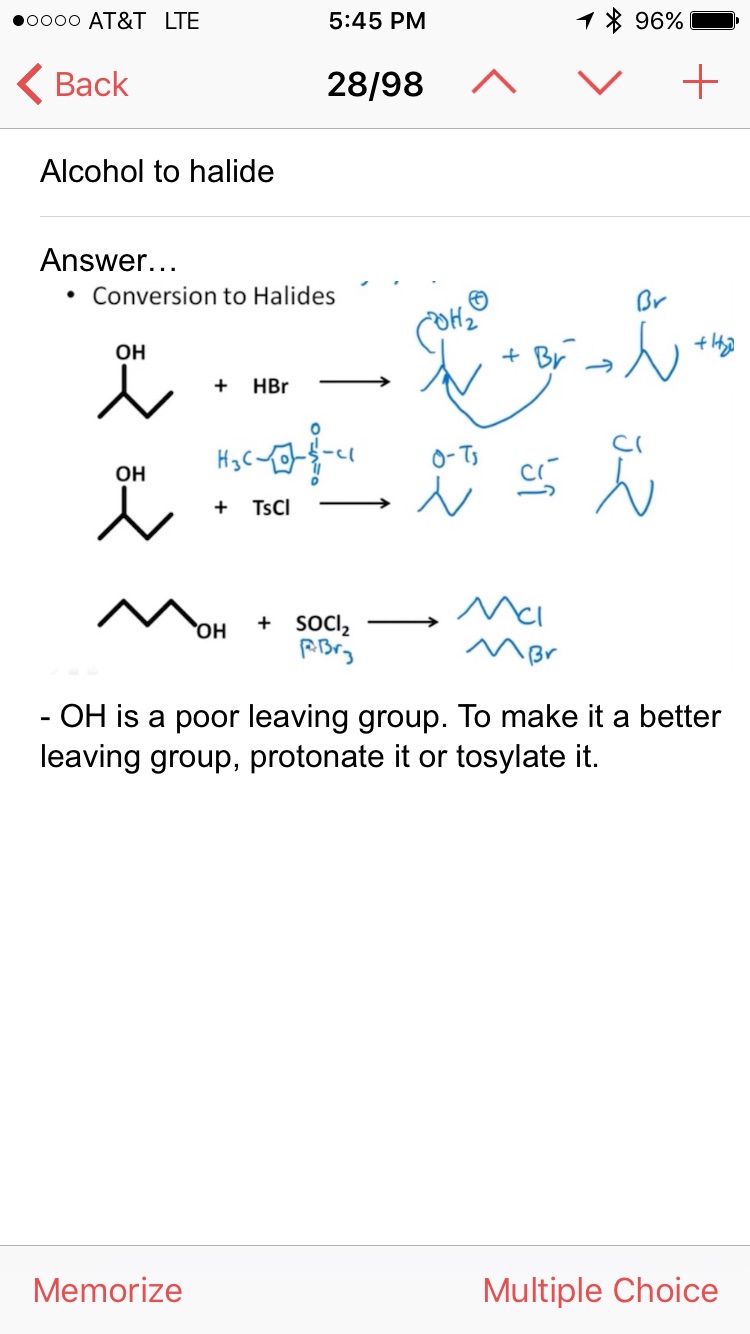


Here is how a flashcard looks in the app. Notice the picture added and my text underneath it.


Screenshot #4:


Here we can see how a flashcard looks in study mode. You can click on one of the buttons on the bottom to organize the card based on difficulty. To see the answer you just have to tap the screen or swipe to the right. 


Pricing:


Mac:

The app costs $7.99 for the desktop version. There is also a lite version if you want to test it out. Click here to download.

The mobile app alone is $3.99. Click here to download.

Total price: $11.98


Windows:

The app costs $4.99. Click here to download.


Conclusion:


Rating: 9/10

Flashcard Hero has all the functionality you will ever need for an affordable price. Its ability to sync flashcards to your phone makes studying much easier. It’s highly customizable and easy to make flashcards are a great time saver. And the ability to study cards based on difficulty gives it a functionality that is not possible with traditional flashcards. For the cost of one meal, you can have an app that lasts you throughout your pre-med career. I only wish that I found the app sooner.


Flashcard Hero (Desktop app)


Flashcard Hero (Mobile only app)


Written by Wil · Categorized: MCAT, Reviews, Study tips · Tagged: flashcard, pre-med, premed, premed program, review, study tips

Sep 14 2017

You need to be doing this for EVERY test

premed, pre med, pre-med, medical school, med school, science, chemistry, biology, physics, organic chemistry, Biochemistry, MCAT, GPA, tips , advice, tutorial, doctor, physician, surgeon, college, undergrad, university

Hello Pre-Meds! I got a simple technique that I began using in my Junior year of college that has helped me tremendously with preparing for exams. I am very happy to share this with you all because it is so simple and easy to implement. Use this technique with my other advice and I am sure your test grades and GPA will soon skyrocket!

We all know that exams are an essential part of being a pre-med. They can make you or break you, and it is often something most pre-med students fear. It is absolutely critical to come into an exam feeling confident. You should already know you are going to make an A on the test before you even step inside. Don’t and I repeat DONT ever go into a test with the mindset that you will wing it and it will all work out. You must have prepared for every aspect of your test prior to sitting down and taking it. Preparation is everything! And there are certain ways you can make sure you are prepared enough for the exam. Thats where creating a good study list comes in handy. Having a good study list and knowing how to use it properly can literally change how you approach every exam from now on. I never take a test without first creating a study list and using it. In this article I am going to show you exactly how to create awesome study lists that will let you enter any exam with confidence!


What is a study list?

A study list is a specific list that you make to help you know what to focus on for an exam. A study list is useful because it both guides your studying to make it efficient and allows you to know when you are ready for your exam. After you have completed your study list you should be confident to go into any exam and ace it! It is an almost fool-proof method of acing your exams.


This is an example study list for a statistics test:

premed, pre med, pre-med, medical school, med school, science, chemistry, biology, physics, organic chemistry, Biochemistry, MCAT, GPA, tips , advice, tutorial, doctor, physician, surgeon, college, undergrad, university


In this study list you can see exactly what you need to focus on for the test. The study list allows you to pinpoint what you need to focus on and then gives you an opportunity to mark it off when you understand it. Once you have mastered everything on your list you know you are fully ready to ace your exam. Preparation is key. And having an exact list of what to focus on will let you know when your preparation is complete. Check off everything on your list and then go into your exam confident!

MAKE SURE TO MASTER EVERY ITEM ON YOUR STUDY LIST BEFORE TAKING THE EXAM. How well you will do on your exam depends on two things: How thorough you make your study list and if you can master each item on it. Make a good study list and complete it before your exam and you will ace it. Period.


How to make a study list:

The first thing I do when making a study list is add the name of the class and the date of the test. This helps me stay oriented to when all my exams are and what subject I’m looking at. When you have multiple exams coming up this is very helpful for keeping track of what to study for.

You can use either a sticky note app, a text document, or hand-written study lists. I have used all three methods and each have their advantages. Just find a convenient method for you that allows you to see it on a regular basis. You want to be reminded as much as possible that you have an exam coming up and what you need to study for it. So make sure your study list is easy to find otherwise it defeats the purpose.

Make sure every item you add to your study list is very specific. You want to make your study list only the things you must know for the exam. The more specific the better. You want to include anything that might appear on the test. The point of the study list is to make sure you are prepared. Don’t leave any gaps in the list. You want to be prepared for anything that might appear. So make sure it is both comprehensive and specific. I will go into two examples of how I make study lists.


Example study list for Chemistry test and how to use it:

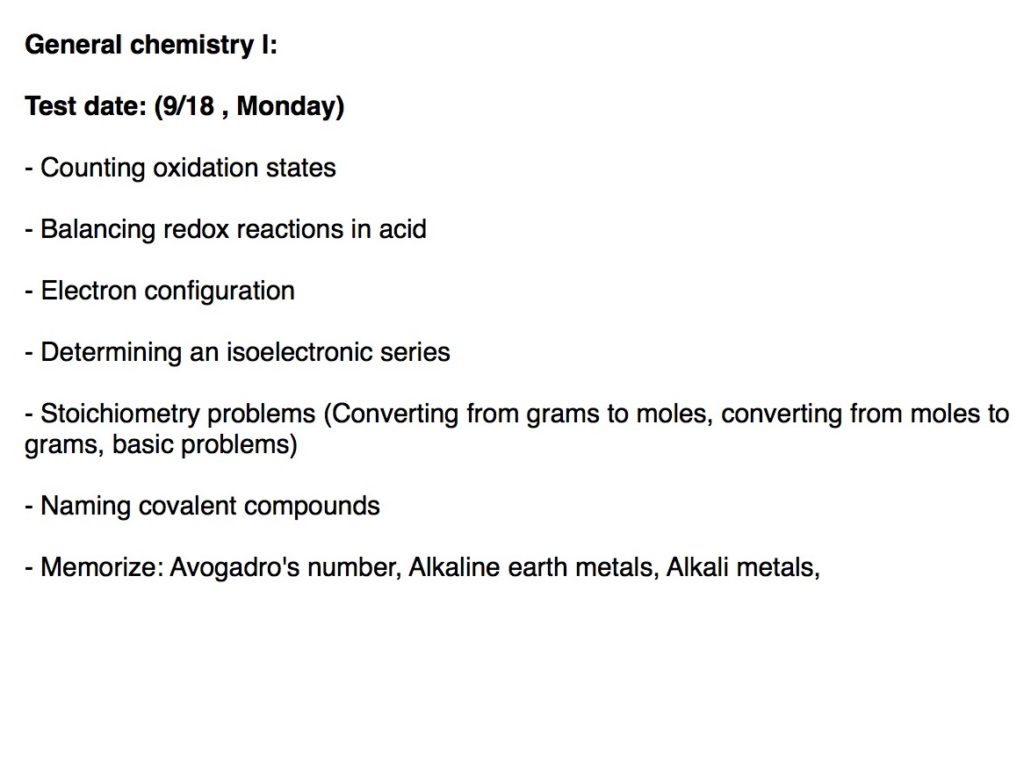
So lets imagine we have a Gen Chem exam coming up. The first thing we want to do is write when the test date is so we can keep track. Then we want to make a list of everything we know will be on the exam or might be on the exam. Make sure these are specific topics to learn. After you have done that you should have something that looks like this ..

premed, pre med, pre-med, medical school, med school, science, chemistry, biology, physics, organic chemistry, Biochemistry, MCAT, GPA, tips , advice, tutorial, doctor, physician, surgeon, college, undergrad, university


Notice that all of the topics added to the list are specific and are reasonable to master.


After you have made your list start by going through each topic one by one. Focus on mastering that topic or until you feel certain you will do well on the exam for those questions. Once you have done that for a topic you can mark it off by either striking through it or deleting it off your list. Lets say that you just finished reading your textbook and did some practice problems on oxidation states, balancing redox reactions, and stoichiometry. Once you feel like you got these topics mastered or at least feel you got the hang of them, check them off your list. Your list should look like this now..


premed, pre med, pre-med, medical school, med school, science, chemistry, biology, physics, organic chemistry, Biochemistry, MCAT, GPA, tips , advice, tutorial, doctor, physician, surgeon, college, undergrad, university


Just keep on mastering each topic on your study list until you have checked them all off your list.


premed, pre med, pre-med, medical school, med school, science, chemistry, biology, physics, organic chemistry, Biochemistry, MCAT, GPA, tips , advice, tutorial, doctor, physician, surgeon, college, undergrad, university


After checking all the topics off your list you are going to be well prepared to handle your exam! It is really that simple. Make a list of all the topics you need to master. Go through your list one by one until you have checked them all off. Once they are all checked off you know that you are prepared and should feel confident! Here is another example for a biology exam.


Example study list for Biology test:

premed, pre med, pre-med, medical school, med school, science, chemistry, biology, physics, organic chemistry, Biochemistry, MCAT, GPA, tips , advice, tutorial, doctor, physician, surgeon, college, undergrad, university


Once again, start by putting the course name and the test date. Make a list of all the topics you need to learn. And master each one of them.


premed, pre med, pre-med, medical school, med school, science, chemistry, biology, physics, organic chemistry, Biochemistry, MCAT, GPA, tips , advice, tutorial, doctor, physician, surgeon, college, undergrad, university


Until all of the topics are mastered. You get the point by now.


premed, pre med, pre-med, medical school, med school, science, chemistry, biology, physics, organic chemistry, Biochemistry, MCAT, GPA, tips , advice, tutorial, doctor, physician, surgeon, college, undergrad, university


After mastering each topic you are fully ready to ace your exam!


Summarizing points:

  • A study list allows you to organize your studying to make it more efficient and provides a way to know when you are ready for your exam
  • Make a study list that covers every topic on your exam
  • Master each topic on your study list one by one, checking them off the list
  • Once  you have mastered each topic on your study list you are ready to take the exam!


The best way to guarantee that you will ace your exams is by going into the test confident. I cannot emphasize this enough. You should always go into your exam knowing how well you will do. If you don’t go in knowing you will make an A, then you didn’t study enough. A study list is a great way to keep track of your tests and how well prepared you are for them. Always go into an exam already knowing you will make an A. Master every topic on your study list and you are going to do well!


Tell us what you think by leaving a comment down below! For more pre-med tips and advice, make sure to subscribe to our newsletter and follow us on Facebook, twitter, and pinterest!
Get Pre-Med Advice and Tips
Thank you for subscribing.
Something went wrong.
I agree to have my personal information transfered to MailChimp ( more information )
Join hundreds of others who are receiving our newsletter and get special deals, discounts, and tips on how to improve your chances of getting into medical school.
Your email address is safe with us, we will not share it with anyone else.
Did you find this article helpful? Let us know!
[yop_poll id=”12″ tr_id=”studylist”]

Written by Wil · Categorized: Improve GPA, Study tips · Tagged: GPA, improve grades, pre-med, premed, study tips

Copyright © 2026 · Altitude Pro on Genesis Framework · WordPress · Log in